
Download EclipseCrossword – crossword puzzle generator, create crosswords, word puzzle tool, puzzle maker, create custom crossword, printable crossword
Overview
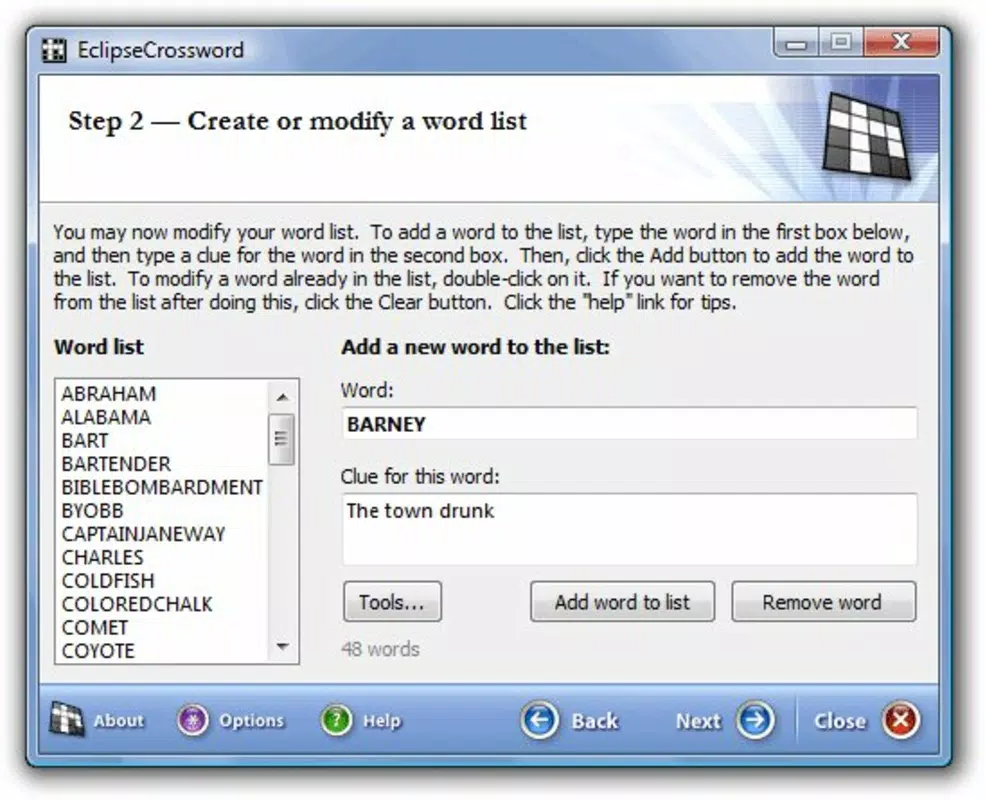
EclipseCrossword is a dedicated tool designed to streamline the creation of custom crossword puzzles from user-provided word lists. Its primary purpose is to simplify the often complex process of constructing crosswords by automating the layout and integration of answer words and their corresponding hints. The app targets educators, puzzle enthusiasts, event planners, and anyone seeking to produce personalized puzzles for classroom use, party games, or personal entertainment. By requiring only the input of words and hints, EclipseCrossword eliminates the need for manual grid design, making it accessible to users without advanced design or puzzle-making skills.
The developer, EclipseCrossword, has positioned this application as a reliable solution within the productivity and utility space, focusing on efficiency and user control. Although the developer did not provide additional technical details about their background or development philosophy, the app’s consistent updates since its initial release in 2007 suggest a long-standing commitment to functionality and usability. Real-world use cases include generating themed puzzles for school lessons, creating trivia challenges for team-building events, or producing family-friendly puzzles for leisure. In the broader app ecosystem, EclipseCrossword fills a niche for specialized, lightweight tools that prioritize precision and ease of use over flashy interfaces.
Key Features & Functionality
- User-Friendly Interface: The app is built around simplicity, allowing users to input words and hints directly into a clean, intuitive layout. No prior experience with puzzle design is required, making it ideal for beginners and casual users.
- Customizable Dimensions: Users can adjust the size and shape of the crossword grid to suit their preferences, enabling both compact and expansive layouts depending on the number of words and desired difficulty level.
- Multiple Output Formats: EclipseCrossword supports various export options, including printable PDFs, interactive web pages, and RTF documents, allowing seamless sharing across platforms and devices.
- Efficient Puzzle Generation: Once the words and hints are entered, the software automatically generates a fully functional crossword grid, intelligently fitting the words together with minimal user intervention.
- Thematic Flexibility: The tool allows users to create puzzles around specific topics—such as science, history, or pop culture—enhancing relevance and engagement for targeted audiences.
For example, a teacher can input vocabulary terms and definitions to generate a printable quiz for students, while a party host might create a themed crossword using clues related to a movie night. The app’s automation reduces the time spent on layout adjustments, enabling users to focus on content creation rather than technical execution.
Interface, UX & Performance
The interface of EclipseCrossword is minimalistic and task-focused, prioritizing functionality over visual flair. Users are presented with a straightforward input panel where words and hints are entered, followed by a real-time preview of the generated puzzle grid. Navigation is linear and intuitive, with clear buttons for generating, editing, and exporting puzzles. The layout remains consistent across sessions, reducing the learning curve for returning users.
Although the developer did not list formal performance metrics, the app’s file size of 5.5 MB suggests a lightweight design optimized for quick loading and low resource consumption. The application runs smoothly on standard Windows systems, with responsiveness maintained even when handling larger word lists. Stability appears reliable, as the app has been in continuous use since its 2007 release, indicating a mature codebase with minimal crashes or bugs. However, specific requirements for device categories or OS versions were not disclosed, so compatibility may vary depending on the user’s environment.
Platform Compatibility & Technical Requirements
EclipseCrossword is available exclusively for the Windows platform. The current version is 2024.1.2, with a file size of 5.5 MB. The app is designed to operate on Windows-based systems, though the developer did not specify minimum OS requirements or hardware specifications.
This lack of detailed compatibility information means users should verify system readiness before installation. The app’s small footprint makes it suitable for older or low-spec machines, but without official system requirements, users are advised to test the application in their environment. No information was provided regarding iOS or Android availability, so cross-platform access is not confirmed.
Pros and Cons
Pros
- Simple, intuitive interface suitable for users of all skill levels.
- Fast and automated puzzle generation with minimal manual input.
- Supports multiple output formats for printing, sharing, and web use.
- Lightweight file size (5.5 MB) ensures quick installation and low storage usage.
- Highly customizable grid dimensions for tailored puzzle designs.
Cons
- Platform is limited to Windows; no support for macOS, iOS, or Android.
- Developer did not disclose minimum OS or hardware requirements.
- Price point of $19.95 may be considered high for a niche utility tool.
- Limited to desktop use; no mobile or cloud-based functionality.
- No built-in update notifications or auto-update feature.
FAQ
Is EclipseCrossword safe to download and install?
Yes, EclipseCrossword is a legitimate software tool developed by a known independent developer. As with any application, it is recommended to download only from official sources to ensure authenticity and avoid potential malware.
Can I use EclipseCrossword on my Mac or mobile device?
Currently, EclipseCrossword is only available for Windows. There is no official version for macOS, iOS, or Android. Users on non-Windows platforms may need to use compatibility layers or alternative tools.
What file formats can I export my puzzles to?
EclipseCrossword supports multiple output formats, including printable PDFs, interactive web pages, and RTF documents, enabling flexible sharing and printing options.
Does EclipseCrossword require an internet connection?
No, the application operates offline. All puzzle generation, editing, and export functions are performed locally on the user’s device.
How often is EclipseCrossword updated?
The latest version, 2024.1.2, indicates ongoing development. However, the developer did not specify a release schedule or update frequency.
Final Thoughts
EclipseCrossword stands out as a focused, efficient tool for anyone needing to generate high-quality, custom crossword puzzles quickly and reliably. Its strength lies in its simplicity and automation—users input words and hints, and the app handles the rest, making it ideal for educators, event organizers, and puzzle lovers. While its Windows-only availability and one-time purchase price may limit broader appeal, the app delivers strong value for its intended audience. The lightweight design, multiple export options, and clean interface ensure a smooth experience across various use cases. For those seeking a dependable, no-frills crossword generator, EclipseCrossword remains a top choice in its category.
Download EclipseCrossword now


